Holm Case: E-Commerce Platform with Prize Draw Mechanics

Brief description
A marketplace with draws and live streams, where products are sold directly or through lotteriesTask
Create an e-commerce platform combining purchases and product draws with transparent mechanics and live streams, while running lotteries legally without licenses and without falling under gambling regulation.About the project
We built a flexible e-commerce platform with unique functionality — a marketplace combined with a draw mechanism and live streams. Holmegy lets users not only buy products directly, but also join lotteries where prizes are real items published by sellers.Business benefits
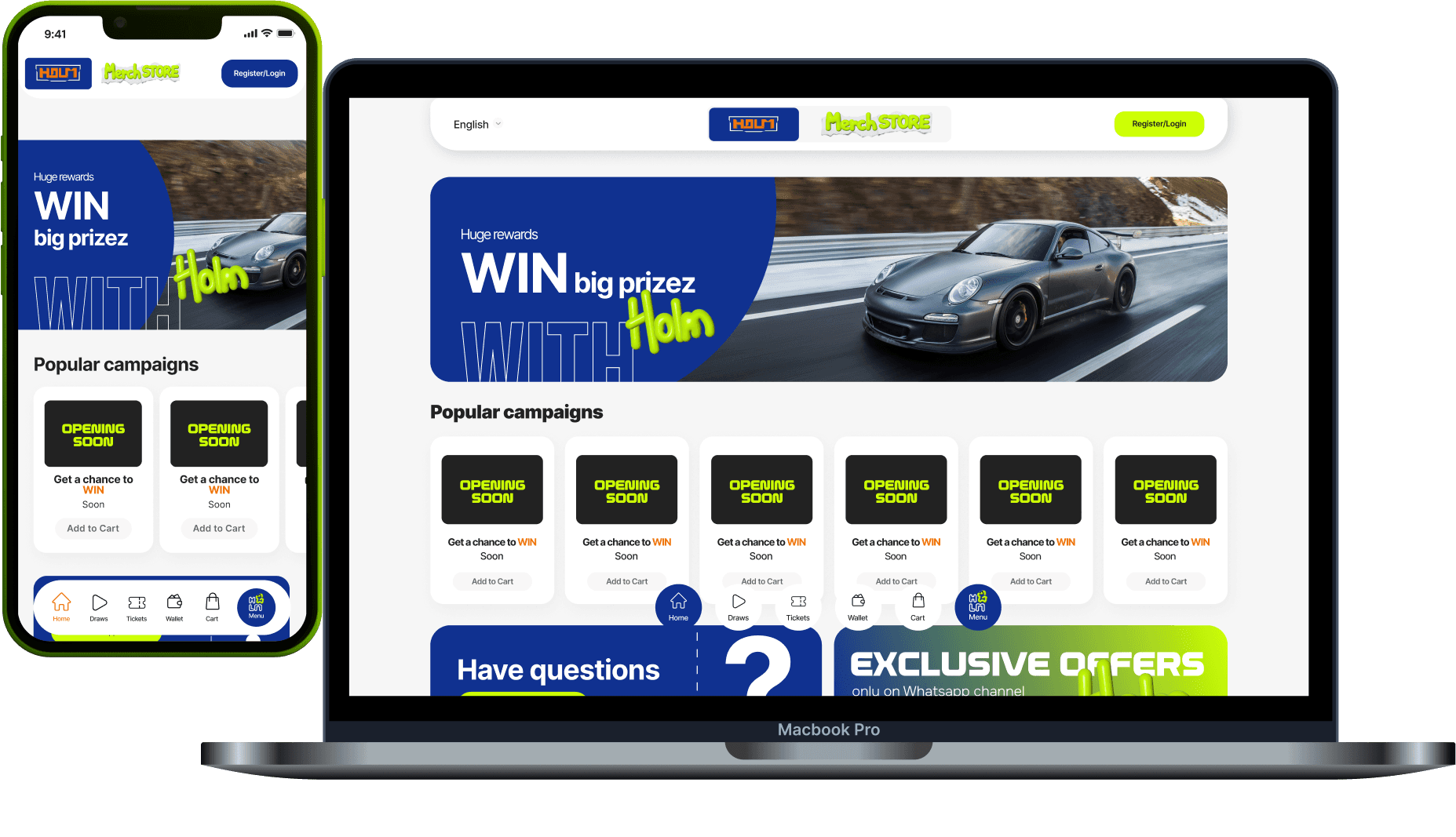
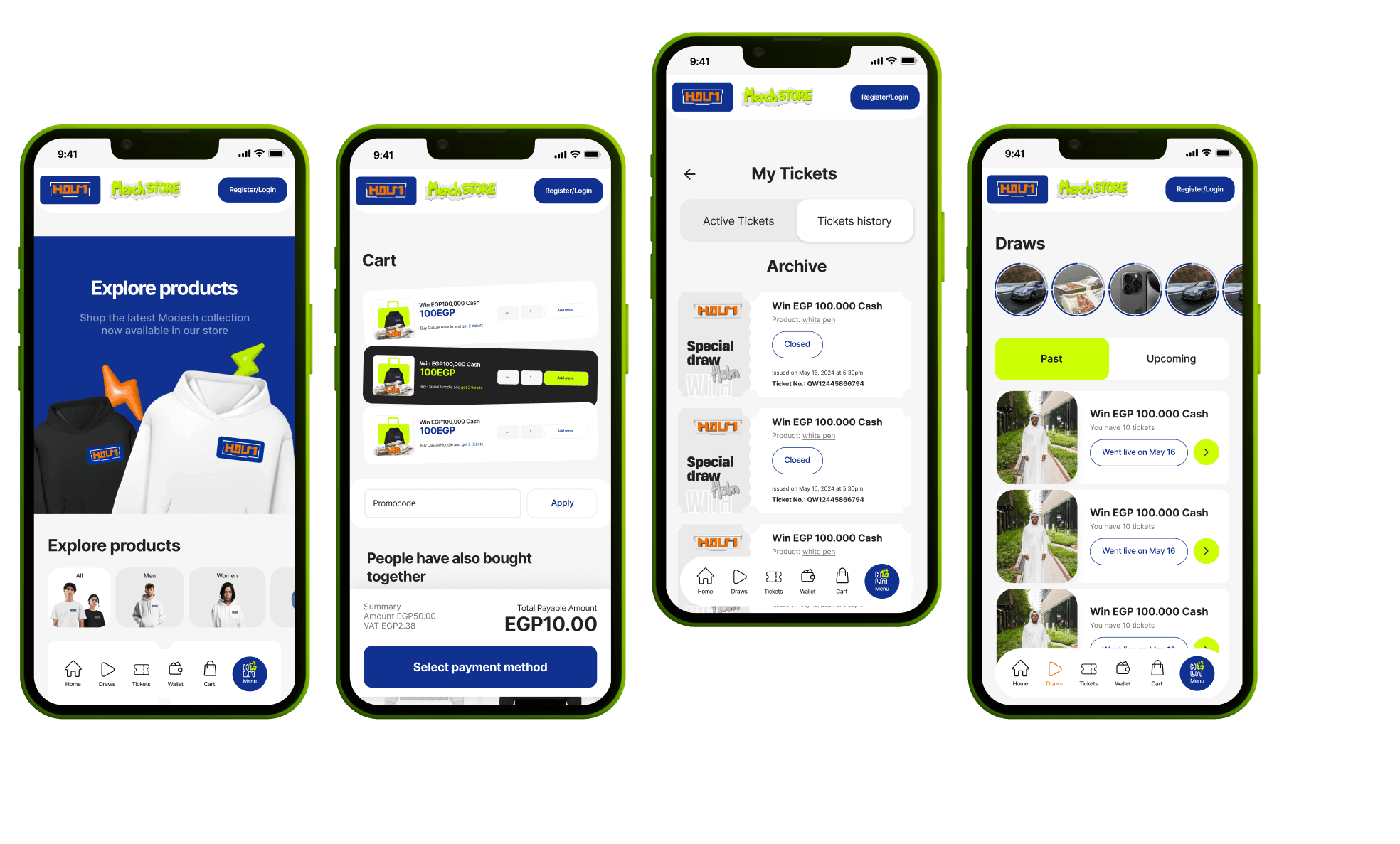
Features

Creating a user account and signing into the personal cabinet
Password recovery
Managing basic profile data
Profile: contacts, delivery address(es), notification settings
Order history and delivery statuses
Lottery participation history and purchased tickets
Viewing wins and prize issuance status
Product listing by the administrator
Creating a product card: name, description, photo/gallery, specifications
Availability management: stock, limits, unpublishing
Product categorization (binding to categories and tags)
Product showcase with sorting and quick card preview
Display of price, availability, purchase and delivery terms
Catalog search
Category and subcategory hierarchy
Filters by parameters (category, price, availability, brand/type — based on product logic)
Sorting (popular, new, price)
Full description, photo gallery, specifications
Display of availability and purchase terms
Add-to-cart button and quick transition to checkout
Cart: changing quantity, removing a product, recalculating the total
Checkout: delivery address, recipient details, delivery method selection
Order confirmation and “accepted for processing” status
Order payment via a payment solution
Order statuses: created, paid, processing, shipped, delivered, cancelled
Status change notifications (email/push/in-app)
Creating a draw for any product
Setting conditions: period, number of tickets, ticket price, participation limits
List of active draws
Draw card: product, description, dates, ticket cost, participation progress
Search and filtering by lotteries (by category/status/dates)
Prize description, photos, participation terms
Draw dates and status
Progress: tickets sold / remaining
Participation button: buy ticket(s)
Buying one or several tickets
Limits on the number of tickets per user (if set)
Binding tickets to the account and displaying them in participation history
Payment confirmation and fixing participation in the draw
History of completed draws
Display of winners for each draw
Showing winners on the main page and in lottery history
Prize issuance status for the winner
Fixing the winner selection rules
Determining the winner when the draw ends
Displaying the result in the interface (who won, which draw, when)
Embedding a YouTube Live broadcast on the draw page
Binding a specific broadcast to a specific draw
Public viewing of the broadcast by platform users
Starting the draw at a scheduled time
Publishing the winner after the broadcast ends
Delivery management for purchases: creating a shipment, tracking, receipt confirmation
Logistics statuses and user notifications
Collecting winner data for delivery/issuance
Confirming prize handover and fixing the result in the system
Issuance history and statuses for each prize
Manual product addition, card editing, photo and description management
Unpublishing, availability and category management
Creating and configuring draw conditions: time, mechanics, limits, ticket cost
Control of active and completed draws
Publishing results and displaying winners
Viewing and managing product orders
Managing order statuses and logistics
Receipt confirmation and order completion
Revenue by products
Revenue by lotteries
Platform commission accounting
Period reports and key metrics
Viewing carts
Purchase history and lottery participation
Creating tickets within a draw
A fixed or dynamic number of tickets is created for each draw
Each ticket has a unique identifier
Tickets are bound to a specific draw and a specific product
Each ticket receives a unique number
Duplication is excluded
The number is fixed in the database and assigned to the user after purchase
The user selects the number of tickets
The cost is calculated automatically
After successful payment, tickets are assigned to the user’s account
Ability to set a ticket limit per user
Ability to set a total ticket limit for the draw
Automatic sale closure when the limit is reached
Tickets are distributed in purchase order
When buying several tickets, the user is assigned a number range
Each user sees their ticket list
The interface displays the number of purchased tickets
Ticket-to-user binding is preserved until the draw ends
Ticket sales stop when the limit is reached or by time
The final number of sold tickets is fixed
The system calculates the winning number
The winner is determined automatically based on the ticket number binding to the user
The result is fixed in the system
The winner is displayed on the draw page
The result appears in lottery history
The winner can be shown on the main page
Information is stored about the number of sold tickets
Number ranges
Winning number
History is available for viewing after the draw ends
Protection against re-generation
After the winner is determined, the draw is locked
Retroactive data changes are impossible
Operation logs
Recording the purchase time of each ticket
Logs of winning number formation
Recording all system actions for audit
Technology stack
React
MobX
ASP.NET Core 8.0 — the basis of the server application.
Entity Framework Core 8.0.3 — ORM for working with the database.
Hangfire — a tool for background tasks.
MailKit and MimeKit — for working with email.
MediatR — an implementation of the CQRS pattern for managing requests and commands.
Swashbuckle — for automatic generation of API documentation (OpenAPI/Swagger).
AWS SDK — for integration with Amazon S3 services.
Twilio — for working with WhatsApp.
PostgreSQL — the main database.
Docker — for application containerization.
Serilog — for logging and monitoring.